
 Update: As of today, February 24, 2010, I’m seeing an update in the App store that restores 3G functionality. This is about 2 weeks after Apple allowed Sling to include 3G functionality in the SlingPlayer app.
We’ve previously written about Apple’s capricious App Store review process, which has caused great frustration for users of Google Voice and other apps. Users of the OrbLive app for iPhone have recently felt Apple’s bite, in a manner that makes the Google Voice fiasco look trivial. OrbLive users recently found out that they didn’t get what they paid for – they had key functionality stripped out of their app in an update, after they’d purchased the app. To make matters worse, some users are complaining that the update notes didn’t advise them that this functionality was being removed. Read on for the full story, and then let us know if this makes you leery about getting an iPhone, or keeping your iPhone if you already have one.
 On our
 If you’re like me, you use many different services for communication. From Outlook, to Gmail, to my iPhone, I have multiple ways to stay in touch. The problem? Until recently, I had my contacts spread out among those platforms, in no coherent fashion. I had no problem keeping my frequent contacts consistent among those platforms, but when it came time to find contact information for someone I hardly contacted, I’d find myself digging among all my platforms, not sure where I had saved that person’s information. Those problems ended when I discovered
 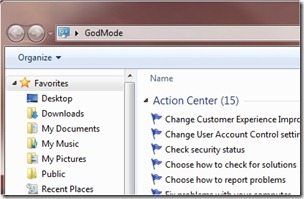 We tech geeks love to discover hidden features in our tech toys. And we love it even more those hidden features are actually useful. An Easter egg that has been making the rounds among Windows 7 users is Windows 7 "God Mode." At its simplest level, what Windows 7 God Mode does is simple – it puts a myriad of configuration options at your fingertips, in one list. Beyond that, users have discovered additional "god modes" that open up more Windows 7 configuration options. Read on for more on God Mode.