Menu Close

Category: Web Apps (page 10 of 16)

Uncluttered Visual Search for Craigslist and Other Online Shops With Spotli

Uncluttered Visual Search for Craigslist, Other Online Shops | 40Tech

I don’t know about you, but I rarely even look at a Craigslist post that doesn’t have a photo of the product attached to it. I don’t see the point. If someone doesn’t take the time to take a photo of what they’re selling, I simply don’t trust it — and I really don’t want to drive to wherever that person lives for a first look at my potential purchase, you know? Spotli has made my life easier by providing a visual search tool for Craigslist and other places to buy online.

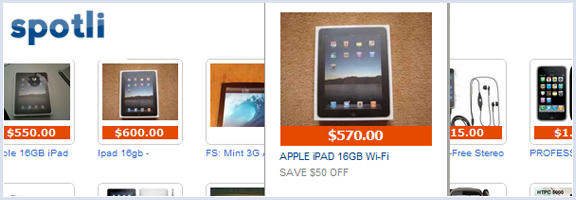
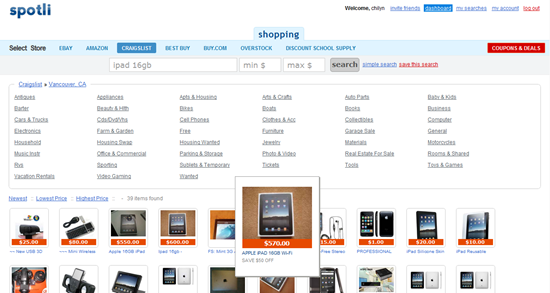
I know that you can already filter Craigslist to only show items with photos, but searching Craigslist is not a pretty experience. At all. It’s uglier than Google — and that’s saying something. Spotli will take your search, even narrowed down to city-level, and display an eye-pleasing grid of images, complete with title and pricing information. Hover over the image that catches your eye and it will expand to a slightly larger size for easier viewing. Click on the image and you will go directly to the listing.
Spotli Visual Craigslist Search | 40Tech

You might wonder what the point is of some of the other online shops (Ebay, Amazon, Best Buy, Buy.com, Overstock.com, Discount School Supply) — after all, they are already visual sites. I find that I like the interface of Spotli much better, however, and highly recommend that you give it a try. I would actually like to see even more stores added, as well as a Canadian option.

Spotli is fully usable without registration, even the Coupons & Deals section, but registering does give a little back, such as saved searches, minor Facebook Connect (to invite friends), and the possibility of more tools in future — maybe sharing functionality for found items?

My only wish for Spotli would be the ability to have my search term be persistent across all stores, so that I don’t need to type it in repeatedly when price-matching. If that were also integrated into the saved search functionality, Spotli could become the perfect shopping companion for me. How about you? What are your thoughts on Spotli? Know of any similar services?
Check out Spotli


Use Your Email to Set Reminders

followupthen1

If you want to set a reminder for yourself, you could do it the hard way by manually adding a reminder to your calendar.  You could also do it the easy way, by using FollowUpThen.  FollowUpThen is a service that allows you to schedule follow-up reminders by simply adding a special email address to the TO:,CC:, or BCC: line of an email message.  This makes it particularly handy as a tool for getting reminders to follow-up with your email recipient, but it also can be used to set normal reminders.

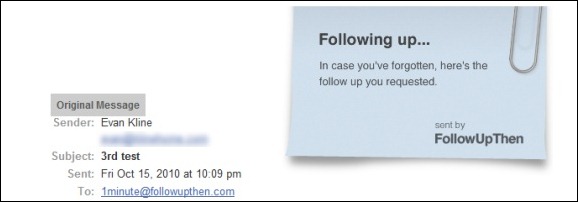
The best way to illustrate how to use FollowUpThen is with an example.  If I email a question to Bobby, and I want to receive a reminder in one day to follow-up with him, I would send an email to Bobby’s address, and add 1day@followupthen to the TO:, CC:, or BCC: line.  In one day, I would then receive a reminder, consisting of my original message along with a “following up . . .” note.  Bobby would also get that reminder, if I used the CC: option when sending the message.

The timing of the reminder can be set with several options.  You can set the reminder by time elapsed (1minute, 3hours, 2days, etc., all followed by @followupthen.com) and day of the week (tuesday@followupthen.com).  You can also set reminders using some natural language words (tomorrow@followupthen.com, nextmonth@followupthen.com, etc.), and by using specific dates or times (mar30@followupthen.com, 9amTomorrow@followupthen.com).  You can even set up recurring reminders, such as everyweds@followupthen.com.  To see a list of all of your reminders, along with links to cancel reminders, send an email to pending@followupthen.com.

For messages sent to followupthen.com using a CC:, both you and the recipient will receive a reminder if your reciepient has not responded by the scheduled time.  In order for the reminder to be canceled, your recipient must use “reply to all” so that the reply is also sent to FollowUpThen.  If you send your email using BCC:, then only you will receive a followup, regardless of any reply by your recipient.  If you just use the “TO:” field, then you will get a reminder after the time interval that you specify.

A service like FollowUpThen does raise some privacy issues, as a third party is receiving your email message.  FollowUpThen claims that it doesn’t share your information with third parties, and that it automatically deletes your email contents, and your recipient’s address, once the follow-up has been sent

For a service that is similar to FollowUpThen, check out FollowUp.cc.  FollowUp.cc has additional features, like a web interface with a calendar, and a clickable link in your reminder email to postpone a reminder.

FollowUpThen [via Cybernetnews]


Create and Publish Your Own Children’s Book with Storyjumper

Create, Publish Your Own Children;s Book with Storyjumper | 40Tech

If you’re an aspiring children’s author, a teacher, or just looking for something fun to do with a kid in your life, Storyjumper is something you’ll want to take a look at. I came across the web app randomly and was amazed by how easy it was to jump in and start creating. In fact, me and my two year old made a book just tonight — and she wrote it.

Read more


Cliqset Adds More Facebook, a Bit of Digg, and Social Search

Cliqset Adds More Facebook, Digg, Social Search | 40Tech

When I last wrote about Cliqset, users were able to fully integrate a Twitter and Google Buzz account, but services like Facebook were one-way only. You could share something from your various connected streams to Facebook, as well as to a multitude of other services, but you couldn’t pull content from Facebook and interact with it. Now you can.

Read more


FREE: Stream Music and Movies from Computer to iPhone, iPad, iPod Touch – and Access Files Too – with ZumoCast

ZumoCast Streams Music, Movies, Files from Computer to iDevice

If you want an easy way to stream media from your home computer to your iPhone, iPod Touch, or iPad, and want it to be free, you’re going to want to check out ZumoCast. It appeared in the app store on September 8th, and it has been awesome ever since! Read more