
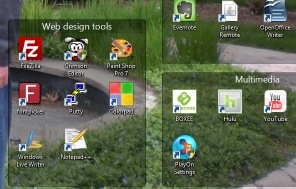
 Windows only: Fences is a program, free for personal use, that helps you organize your Windows desktop. I don’t know about you, but I have problem with organization when it comes to computers. When I install an application, I often install the startup icon for that application on my desktop. When I download files, I usually download them to my desktop, thinking that if they are on my desktop, I won’t forget to clean them up later. That’s the plan at least. The reality is that after time, this results in a desktop filled with many application icons, downloaded files, and other debris that makes my desktop a virtual mess.
Month: July 2009 (page 2 of 3)
 Many of you use more than one computer. You probably have a computer at home and one at work, and you may even have a laptop as well. Some of you probably even have a few computers in different rooms in your home. Keeping track of logins, passwords, bookmarks, and other information between your computers can be a real pain in the neck. Fortunately, there are some online tools to help you keep all of this information in sync. Here are five of them.
 This tip will be so unnecessary for many of you that I almost hesitate to write it. I am always amazed, though, at how freely some people give out their email addresses, and the email addresses of others. My wife knows that this is a pet peeve of mine. When I see an item show up in my inbox due to her submission of my email address on a site, my blood pressure boils. And I’ve seen her and others register on all sorts of sites using their main email address. Many sites have privacy policies in which they assure you that your address will not be sold or used, but plenty of sites have opt-out provisions buried in hard to find places. There are a few easy ways to protect your address, and the addresses of your family and friends.
Read more
 On Tuesday night, Google announced its new Chrome operating system, with the code due for release later this year, and netbooks that run it due in the second half of 2010. Some of the announcement is sure to be marketing speak, as Google’s announcement seems to promise the world. Or does it? Is Google able to promise what it does, because the OS itself is actually going to deliver very little?
Someone Sends You Stolen Confidential Documents. Would You Publish Them?
Read more