
 The internet is like the wild west, with all sorts of unsavory sites waiting for the unsuspecting. If you have children, it can be particularly scary, as your kids could intentionally or unintentionally come upon websites that are not for the faint of heart, let alone suitable for children. You aren’t without defenses, though. One way to protect your children is through the use of DNS servers.
DNS (short for Domain Name System) servers are the phone books of the internet, as all sites really reside at numerical IP addresses, such as 208.65.153.238 for YouTube. So that we don’t have to remember those numbers, when you type “youtube.com” into your browser’s address bar, that request is sent to a DNS server, which matches that request with the correct numerical address, so that you are sent to one of the YouTube servers. By default, most people use their internet service provider’s DNS servers, without even knowing it. You can change that, however.
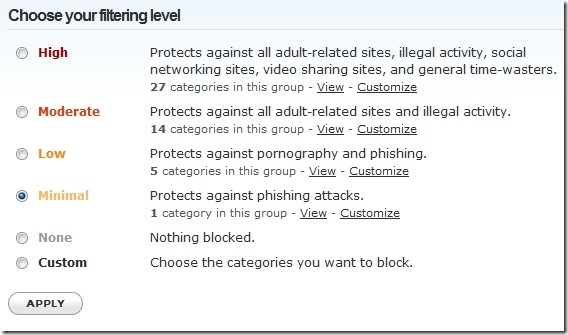
OpenDNS is a free independent DNS service that can protect your family on the internet. If you set up a free OpenDNS account, and use OpenDNS as your DNS service (instructions can be found here), you can customize OpenDNS to block selected types of content from ever reaching your computer or network. At its most basic level, you can set OpenDNS to block broad categories of sites, as demonstrated in the screenshot below.
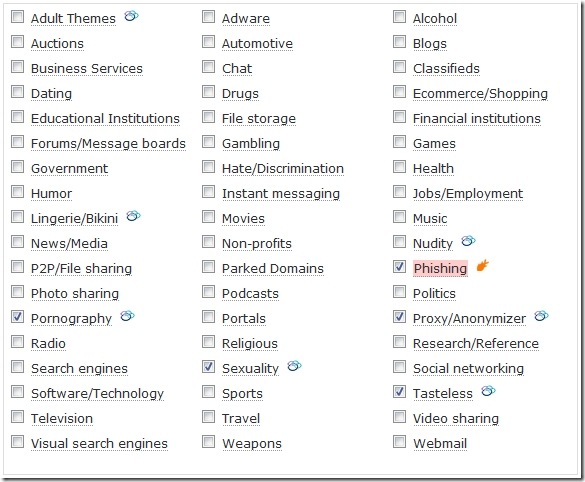
If you prefer, you can customize your protection to a much greater level, by selecting very specific categories of sites to block. The screenshot below shows you the customization that is available.
OpenDNS has additional features, such as Botnet protection, typo correction (for example, changing google.cmo to google.com, on the fly), statistics, and custom messages on blocked pages.
OpenDNS is not foolproof, and there are ways around it (which I won’t cover here). By default, if you use a router, computers on the network will use the router’s DNS settings. This can be overridden by individual computers, however, if a user knows how to change DNS settings on that computer. Some routers, though, can prevent this, providing you with the option to force all traffic through the DNS servers set by the router, regardless of an individual computer’s settings.
One of the benefits of using OpenDNS for protection is that it won’t slow your system down, like some “nanny” software can. In fact, I’ve found that the OpenDNS servers are faster than my ISP’s DNS server.
Are any of you using OpenDNS? Or has anyone found an even better solution to provide protection from the dangers of the internet?

Ruchi says:
Too good . Childern these days study less and surf illegal things more. This is surely useful thing. I am going to share this link with all my friends . Thanks a lot.
August 4, 2009 — 8:39 am
Evan Kline says:
I’m glad you found it useful, Ruchi. I pretty much just use it for anti-phishing, but when I have surfing-age kids, I imagine I’ll use it more.
August 4, 2009 — 8:59 am
Bobby says:
Nice. I had heard of OpenDNS, but never really investigated. I will definitely need something to create my own internet dicatorship here at home in the next few years. Kids start surfing at 3 and 4 now, man!!!
I wonder, does it have the ability to customize categories for your personally (as in to allow some of the sites that a certain category blocks) or to block individual sites?
Anyone know?
August 4, 2009 — 11:25 am
Evan Kline says:
I do believe that it can be set to blacklist/whitelist on a per site level. Our IT guy at the office has our firm on it, and he does that from time to time.
August 4, 2009 — 11:27 am
Gravity says:
I have been using OpenDNS for sometime now as my DNS was really slow on refreshing but i never know you could use it for parental control. Really cool!
August 4, 2009 — 4:23 pm
Kosmo @ The Casual Observer says:
Along the same lines, here is a “strange but true” story.
The father of a friend of mine is a teacher. On day, the principal decided that porn fighting was a top priority, and that the off-the-shelf software was simply not good enough. He empowered my friend’s dad to search and block every single porn site on the internet. No stone was to be left unturned.
The overtime continued to accumulate until the principal moved on to a different job and was replaced by someone who recognized that one man using Google simply could not keep up with the pace of the internet pornographers …
August 6, 2009 — 9:47 am
Evan Kline says:
@Kosmo- wow, talk about someone who doesn’t understand the Internet. That reminds me of how quaint it was, back in the early days of the internet, when Yahoo’s mission was to index the entire internet by hand.
August 6, 2009 — 9:54 am
Thogek says:
Having a family at home with two high-school teens, and not much looking forward to the performance slowdowns and the time to review monitoring software solutions (but which I may end up doing anyway), I took a shot last week at setting up our home wireless router to use OpenDNS. So far, the results are looking good. Web use seems slightly faster then before, and the content-blocking functionality seems to work very well, with a seemingly very broad awareness of the domains that fit into each of its 54 or so blockable categories.
I did have a couple of periods so far where the blocking behavior seemed disengaged (and we could view anything unrestricted); not sure why. I’m keeping an eye on that, and hoping that it’s just an issue with coordinating our DSL’s dynamic IPs (which should then go away once I have the OpenDNS’s dynamic IP client software running on all computers in the house).
September 22, 2009 — 2:00 pm
Evan Kline says:
I’m glad it is working for you Thogek. It does sound like the problem you had could have been an IP issue, so hopefully the dynamic IP software will take care of that for you.
September 22, 2009 — 4:16 pm